
Last updated on
Oct 2, 2026

Get the free US Department of Commerce Performance Management Record
We are not affiliated with any brand or entity on this form

Fill out
Complete the form online in a simple drag-and-drop editor.

eSign
Add your legally binding signature or send the form for signing.

Share
Share the form via a link, letting anyone fill it out from any device.

Export
Download, print, email, or move the form to your cloud storage.
Why pdfFiller is the best tool for your documents and forms


End-to-end document management
From editing and signing to collaboration and tracking, pdfFiller has everything you need to get your documents done quickly and efficiently.
Accessible from anywhere
pdfFiller is fully cloud-based. This means you can edit, sign, and share documents from anywhere using your computer, smartphone, or tablet.
Secure and compliant
pdfFiller lets you securely manage documents following global laws like ESIGN, CCPA, and GDPR. It's also HIPAA and SOC 2 compliant.
What is Performance Management Record
The US Department of Commerce Performance Management Record is a performance appraisal form used by federal agencies to evaluate and document employee performance.
pdfFiller scores top ratings on review platforms




Who needs Performance Management Record?
Explore how professionals across industries use pdfFiller.

Performance Management Record is needed by:
-
Employees seeking appraisal documentation.
-
Supervisors responsible for performance evaluations.
-
Classification officials involved in employee assessments.
-
Rating officials overseeing evaluation processes.
-
Reviewing officials ensuring compliance with performance standards.
Comprehensive Guide to Performance Management Record
What is the US Department of Commerce Performance Management Record?
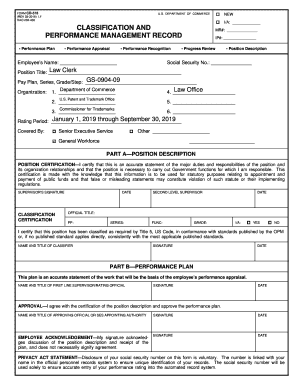
The US Department of Commerce Performance Management Record, also known as the CD-516 form, serves a crucial function in evaluating the performance of federal employees. This evaluation process is vital for maintaining accountability within the agency and ensuring that employee contributions align with organizational goals. Various roles, including employees, supervisors, and rating officials, interact with this federal employee evaluation form as part of their performance management duties.
Purpose and Benefits of the US Department of Commerce Performance Management Record
The CD-516 form is essential for both employees and supervisors, providing a structured approach for performance evaluations. This government performance management record is instrumental for compliance and documentation purposes. By utilizing the form, organizations can ensure employees are held accountable and supported in their professional development, ultimately enhancing overall performance. Advantages such as clear performance expectations and regular feedback contribute to a productive work environment.
Key Features of the US Department of Commerce Performance Management Record
The CD-516 form includes several key elements designed to facilitate effective performance evaluations. Major sections of the form encompass:
-
Position Description: Articulates job responsibilities and expectations.
-
Performance Plan: Aligns employee objectives with departmental goals.
-
Progress Review: Monitors employee performance over a specified period.
-
Certification: Validation by required signers, ensuring the accuracy of information.
Signature requirements vary across roles, emphasizing the collaborative nature of the evaluation process.
Who Needs the US Department of Commerce Performance Management Record?
Multiple stakeholders are involved in the performance evaluation process, necessitating the use of the CD-516 form. Key roles that are required to sign the form include:
-
Employee
-
Supervisor
-
Classification Official
-
Rating Official
Each of these roles plays a pivotal part in the completion of the form, ensuring that accurate evaluations benefit the entire team and contribute to organizational success.
How to Fill Out the US Department of Commerce Performance Management Record Online (Step-by-Step)
Completing the CD-516 form online using pdfFiller is a straightforward process. Follow these step-by-step instructions:
-
Access the CD-516 form on pdfFiller.
-
Enter the employee’s name in the designated field.
-
Fill in the performance ratings, ensuring all entries are accurate.
-
Review the form and include any necessary comments.
-
Certify the information by stating, "I certify that this is an accurate statement." and submit the form.
Common Errors and How to Avoid Them
To minimize mistakes while filling out the CD-516 form, users should be aware of frequent pitfalls. Common errors include:
-
Incomplete sections, such as missing performance ratings.
-
Omitting required signatures from relevant parties.
-
Failing to review the entry for accuracy before submission.
To avoid these issues, it is crucial to review the completed form thoroughly, ensuring all required fields are appropriately filled out.
Submission Methods and Delivery for the US Department of Commerce Performance Management Record
Submitting the completed CD-516 form can be done through various methods. Options include:
-
Digital Submission: Utilize online platforms like pdfFiller for rapid processing.
-
Physical Delivery: Submit paper copies to the appropriate department.
Be mindful of any deadlines associated with submission to ensure that evaluations are processed promptly.
Security and Compliance When Using the US Department of Commerce Performance Management Record
Data protection is paramount when handling the US Department of Commerce Performance Management Record. With pdfFiller's security measures, including 256-bit encryption and adherence to HIPAA and GDPR standards, users can trust that sensitive information is safeguarded. Maintaining privacy and data integrity is essential during the entire performance evaluation process.
Leverage pdfFiller for an Efficient Submission Experience
Using pdfFiller simplifies the process involved in submitting the CD-516 form. Benefits include:
-
Convenience: Easily edit, fill, and sign the form from any browser.
-
Accessibility: Access your documents securely and efficiently.
-
Comprehensive Management: Utilize various features for document organization and sharing.
Leveraging these capabilities ensures a smooth and efficient experience when handling performance management records.
How to fill out the Performance Management Record
-
1.To access the US Department of Commerce Performance Management Record on pdfFiller, visit the site and use the search bar to locate the form by its official name or category.
-
2.Once you have found the form, click on it to open it in the pdfFiller editing interface, where you can view and fill out the necessary fields.
-
3.Before starting to complete the form, gather all required information, including your position details, performance plan, and any relevant notes from progress reviews.
-
4.Navigate through the form by clicking into each section. Fill in the employee’s name, position title, and other required information where prompted.
-
5.Utilize checkboxes in the performance evaluation sections to select appropriate performance ratings. Make sure to follow any specific instructions provided in the form.
-
6.After completing all fields, review the entire document thoroughly to ensure accuracy and completeness, checking for any missed sections or signatures.
-
7.Once finalized, save your progress by clicking the save icon. You may also download the document to your device or submit it directly through pdfFiller by following the submission prompts provided on the platform.

Who is eligible to complete the US Department of Commerce Performance Management Record?
All employees under the US Department of Commerce and their respective supervisors, classification officials, rating officials, and reviewing officials are eligible to complete this performance appraisal form.
Is there a deadline for submitting the performance management record?
The form is typically submitted annually, but specific deadlines may vary by department. Check with your HR department for any specific time-sensitive requirements.
How do I submit the completed performance management record?
You can submit your completed form directly through pdfFiller or download it to submit manually via email or postal service, following your department's guidelines.
What supporting documents do I need when filling out the form?
While the form itself may not require additional documents, you should have your performance plan, position descriptions, and any previous evaluation notes available for reference.
What are some common mistakes to avoid while completing the form?
Be careful to fill out all required fields accurately and check for grammatical errors. Also, ensure all necessary signatures are obtained before submission to avoid processing delays.
What is the processing time for the performance management record?
Processing times can vary, but it’s generally processed within a few weeks after submission. Confirmation of receipt and processing status should be communicated through your HR department.
What should I do if I encounter issues while filling the form on pdfFiller?
If you encounter issues, check pdfFiller’s support resources or contact customer support for assistance with technical difficulties related to form completion or submission.
Related Forms


Get the latest insights from our blog


If you believe that this page should be taken down, please follow our DMCA take down process
here
.
This form may include fields for payment information. Data entered in these fields is not covered by PCI DSS compliance.